cardcapture
Editor : command(편집 명령) 기능 구현 (2) Command Pattern
2025-01-13
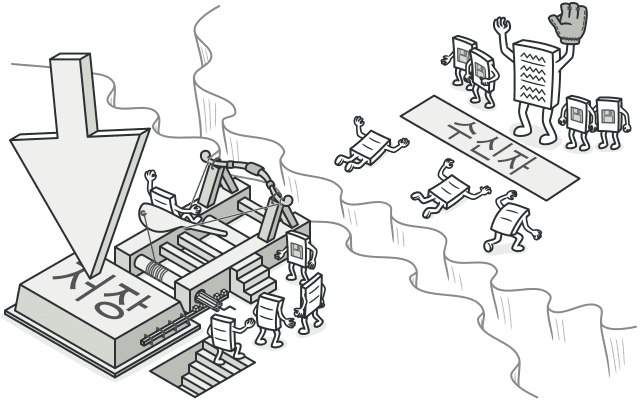
커맨드 패턴으로 리팩토링하게 된 계기
현재 커맨드 기능이 잘 동작하고 있지만, 커맨드를 확장하기 어렵고 커맨드 스토어의 변경을 추적하는 데 불편함을 느꼈다. 이런 문제들을 해결하고자 리팩토링의 필요성을 느꼈다.
어떻게 커맨드를 구현해야 불편함을 개선하고, 상태 변경의 흐름을 제대로 추적할 수 있을지 고민하던 중, 멘토님께서 '일반적으로 커맨드를 어떻게 구현하는지 찾아보는 건 어떨까요?'라는 힌트를 주셨다. 그 결과, 디자인 패턴 중 하나인 커맨드 패턴에 대해 학습할 수 있었다.
커맨드 패턴
의도
- 요청을 요청에 대한 모든 정보가 포함된 독립 실행형 객체로 변환하는 행동 디자인 패턴
- 요청 -> 독립 실행형 객체로 만드는 '행동'
문제
- 버튼을 예시로 들어서 설명해보자면, 버튼 클래스가 존재하고 버튼 클래스를 상속하여 다양한 동작을 수행하는 자식 클래스를 만듦
- 그렇게 되면 기본 클래스를 수정했을 때 자식 클래스 코드를 깨뜨릴 위험이 생김 -> 그래픽 사용자 인터페이스 코드(자식)는 비지니스 로직(기본)의 불안정한 코드에 의존하게 됨
- 일부 작업은 여러 위치에서 호출될 수도 있음 -> 그런데 작업이 자식 클래스 내부에 구현되어 있으면 관련 코드를 복사하거나 상속해서 새로운 버튼을 제작해야 하는데 나쁜 방식임
해결책
-
관심사 분리의 원칙 기반으로 그래픽 사용자 인터페이스 레이어와 비지니스 로직 레이어를 분리
- 한 객체(사용자 인터페이스)가 다른 객체(비지니스 로직)에게 요청을 전송
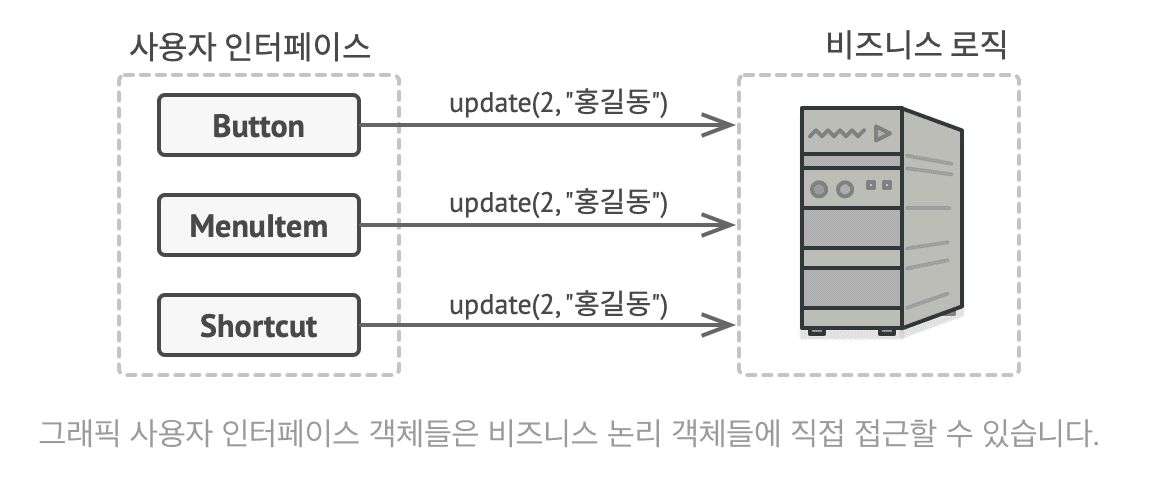
- 한 객체(사용자 인터페이스)가 다른 객체(비지니스 로직)에게 요청을 전송
-
커맨드 패턴은 이러한 로직 분리에서 더 나아가 요청을 전송할 커맨드 클래스를 구현하라고 제안
- 요청 세부정보를 요청을 작동시키는 단일 메서드를 가진 커맨드 클래스로 추출
- 사용자 인터페이스 객체는 요청이 어떻게 처리할지에 대해 알 필요가 없음
- 사용자 인터페이스는 커맨드를 작동시키고, 작동된 커맨드는 세부 사항을 처리
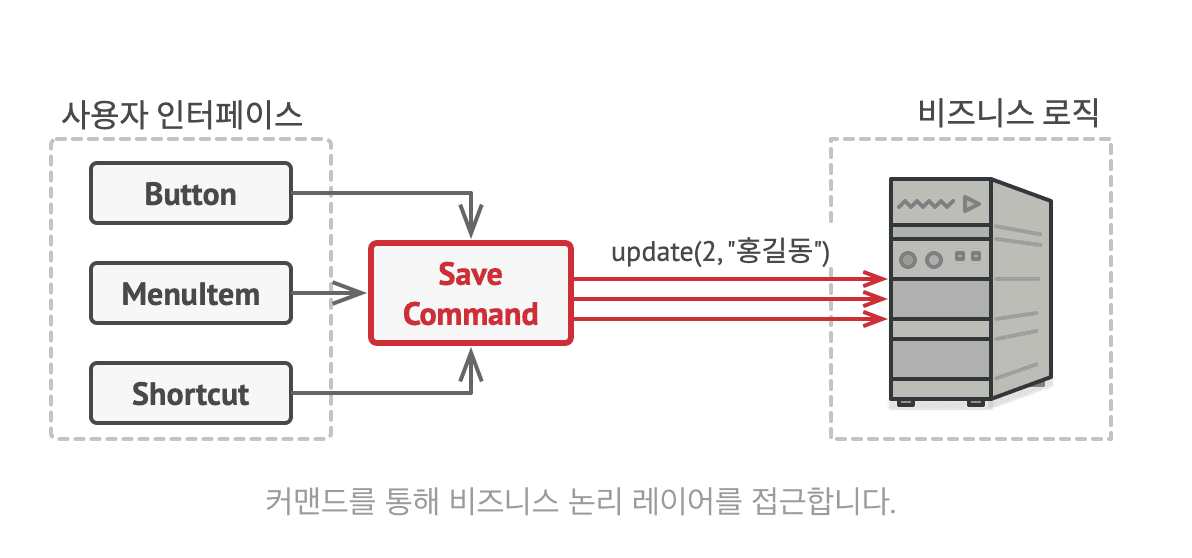
-
커맨드 : 요청을 객체로 '캡슐화'하기
- 모든 명령들이 따라야 하는 공통된 규칙(공통 인터페이스)를 지정
- 매개 변수를 받지 않는 단일 실행 메서드를 가짐
- 커맨드들이 구상 클래스와 결합하지 않고 사용 가능해짐
문제 해결해보기
이제는 Button 클래스를 상속해서 자식 클래스를 만들 필요가 없음. 기초 Button 클래스에 커맨드 객체에 대한 참조를 저장하는 필드를 두고, 버튼 실행시 해당 커맨드가 시행되게 하면 됨
- 자식 버튼 클래스들이 아니라 다양한 작업에 대한 커맨드 클래스를 구현하기
- 사용자 인터페이스와 비지니스 로직 레이어 간의 결합도를 줄임
실제 상황 예시
레스토랑에서 웨이터에게 음식 주문 -> 웨이터는 부엌에 가서 주문 전달 -> 요리사는 요리 -> 웨이터는 완성된 음식을 손님에게 다시 전달
구조

- invoker(발신자 - 웨이터) : 커맨드 객체를 실행시키는 트리거, 커맨드 객체에 대한 참조를 저장할 필드를 가지고 있음(어떤 커맨드를 실행해야 하는지 정보)
- command(커맨드 - 주문서 양식) : 커맨드를 실행하기 위한 단일 메서드만을 선언, 커맨드의 실행 방법을 정의
- concrete command(구상 커맨드 - 구체적인 주문) : 다양한 유형의 요청 구현, 자체적으로 작업 수행X, 수신자에게 구체적인 요청을 전달
- receiver(수신자 - 요리사) : 비지니스 로직을 포함. 실제 작업을 수행
- client(클라이언트 - 손님) : 구상 커맨드 객체들을 만들고 설정, 매개변수들을 커맨드의 생성자로 전달 -> 모든 것을 설정하고 연결하는 역할(1,2,3,4 생성하고 연결하는 역할, 주문을 만드는 사람)

구현방법
- 단일 실행 메서드로 커맨드 인터페이스 선언
- 요청들을 구상 커맨드 클래스들로 추출. 각 클래스에는 수신자 객체에 대한 참조와 요청 인수를 저장하기 위한 필드의 집합 필요
- 발송자 역할을 할 클래스 식별. 커맨드 저장을 위한 필드 선언. 자체적으로 커맨드 객체 생성하지 않고 클라이언트 코드에서 커맨드 객체 가져옴
- 수신자에게 직접 요청 보내는 대신 커맨드를 실행하도록 함
- 클라이언트는 수신자 생성 -> 커맨드 생성 후 수신자와 연결 -> 발송자 생성 후 커맨드와 연결
장단점
- 장점
- 단일 책임 원칙 준수 : 작업을 호출하는 클래스와 수행하는 클래스 분리
- 개방 폐쇄 원칙 준수 : 클라이언트 코드를 손상시키지 않고 새 커맨드 도입 가능
- 실행 취소, 다시 실행 구현 가능
- 작업을 지연시켰다가 실행 구현 가능
- 간단한 커맨드의 조합으로 복잡한 커맨드 생성 가능
- 단점
- 발송자와 수신자 사이에 새로운 레이어 도입하기 때문에 코드가 복잡해질 수 있음
커맨드 디자인 패턴과 기존 구현 방식
커맨드 패턴을 학습하고 나서, 기존 로직의 문제점을 더 명확하게 인지할 수 있었다. 커맨드(편집 명령)는 명령을 통해 상태를 변경하고, 변경된 명령을 기록해 또 다른 명령이 실행될 수 있게 해야 하는데, 내가 구현한 방식은 상태가 변경되면 그 상태를 통해 커맨드를 만들어 저장하는 방식이었다.
이 방식은 커맨드를 통한 상태 관리와 트래킹이 어려울 뿐만 아니라, 상태를 추출하여 저장하는 과정에서 원하지 않는 상태가 저장될 위험도 있어 예측할 수 없는 결과를 초래할 수 있었다.
왜 나는 이렇게 설계를 한걸까? 하고 되돌아봤는데, 기존의 상태 저장 로직을 변경하지 않고 새로운 기능만 덧붙여서 빠르게 구현하고 싶었던 마음이 반영된 것 같다. 리팩토링을 위해 커맨드 패턴으로 설계하는 과정에서 지금까지 구현한 모든 상태 변경 방식을 변경해야 하는 게 느껴져서 그 당시의 내가 잘 했다고 할 수는 없지만 이해는 됐다.. 동시에 사전 조사와 설계의 중요성을 깨달았다.
커맨드 디자인 패턴의 관점에서 기존 코드의 문제점
- 발신자가 불명확함 : useCommandStore가 발신자 역할까지 같이하고 있음
- 발신자 역할 : 커맨드 객체를 실행시키는 역할
- 수신자의 역할이 모호함 : useCardStore가 수신자인데, 수신자를 직접 호출함
- 구상 커맨드들이 캡슐화되어 있지 않음 : 클래스로 구현되지 않음 -> 새로운 커맨드 추가하기 어려움
- 실행, 취소 로직이 중앙화 되어있음 : switch 문으로 관리해서 중앙화 됨 -> 유지 보수 어려움
코드를 어떤 방향으로 수정해야 할까?
- 발신자를 명확하게 하기 -> Invoker 클래스 생성
- 구상 커맨드 클래스 구현 -> Command를 implements 한 커맨드 구현
- 실행 취소 로직을 자기 자신 클래스 내부에 작성해서 캡슐화 -> 어떤 행동하는지 숨기기
- switch 문 제거로 유지보수가 쉬워짐 -> 새로운 커맨드 생겨도 간단하게 해결 가능
커맨드 패턴 적용
1. 타입 정의
커맨드 기본 타입에 대한 정의와 구상 커맨드들의 종류, 각 구상 커맨드들이 가질 매개변수에 대해 정의해주었다.
- Command : 이제는 커맨드에 대한 '값' 정보를 기억하고 있는 것이 아니라 실행, 취소 시 어떤 '행동'을 할 것인가에 대하여 기억할 것이다. 그래서 type, execute(), undo() 프로퍼티를 가진다.
- CommandType : 어떤 커맨드 유형인지 나타내는 타입이다. 해당 타입에 따라 어떤 구상 커맨드를 제작할지 정해진다. 어떤 변경이 일어나는지에 따라 분류하여 타입을 정하였다.
- CommandParamsMap : 커맨드 타입에 따라 카드 데이터를 변경할 떄 필요한 데이터(매개변수로 받아올 값)에 대해 정의해주었다. (커맨드 팩토리를 이용하여 커맨드를 제작할 것이기 때문에 제네릭으로 타입을 지정할 수 있도록 선언함)
export type Command = {
  type: CommandType;
  execute: () => void;
  undo: () => void;
};

export type CommandType =
  | 'ADD_LAYER'
  | 'DELETE_LAYER'
  | 'MODIFY_POSITION'
  | 'MODIFY_TEXT_LAYER'
  | 'MODIFY_IMAGE_LAYER'
  | 'MODIFY_SHAPE_LAYER'
  | 'MODIFY_ILLUST_LAYER'
  | 'MODIFY_BACKGROUND'
  | 'ADD_CARD'
  | 'DELETE_CARD'
  | 'COPY_LAYER'
  | 'PASTE_LAYER';

export type CommandParamsMap = {
  ADD_LAYER: {
    cardId: number;
    type: LayerType;
    content?: Partial<LayerContentMap[LayerType]>;
    position?: Partial<BasePosition>;
  };  DELETE_LAYER: {
    cardId: number;
    layerId: number;
  };  MODIFY_TEXT_LAYER: {
    cardId: number;
    layerId: number;
    text: ReactQuill.Value;
    initialText: ReactQuill.Value;
    isFirstModification?: boolean;
  };  MODIFY_IMAGE_LAYER: {
    cardId: number;
    layerId: number;
    content: Image;
  };  MODIFY_SHAPE_LAYER: {
    cardId: number;
    layerId: number;
    color: string;
    initialColor: string;
  };  MODIFY_POSITION: {
    cardId: number;
    layerId: number;
    position: Position;
  };  MODIFY_BACKGROUND: {
    cardId: number;
    backgroundData: Partial<Background>;
    initialBackgroundData: Background;
  };  COPY_LAYER: {
    cardId: number;
    layerId: number;
  };  PASTE_LAYER: {
    cardId: number;
  };};

export type BasePosition = Omit<Position, 'zIndex'>;
2. 구상 커맨드 정의
구상 커맨드 종류가 많은 만큼 코드가 너무 길어서 일부만 가져와보았다.
- 값을 변경하는 함수는 이전 CardStore에서 구현되어 있던 메서드들을 사용하였다.
- 변경되는 레이어와, 어떻게 변경할 것인지에 대한 데이터를 props로 받아와서 execute와 undo에 대한 행동을 정의하여 캡슐화한다. (props로 받아온 데이터 타입에 대한 정의가 위의 CommandParamsMap이다.)
- command가 어떤 데이터를 어떻게 변경해야 하는지에 대한 행동을 정의해주었다. 해당 커맨드의 메서드들을 호출해서 데이터를 변경하니까 데이터를 잘못 변경하거나 저장하는 일이 없어졌다.
export const createAddLayerCommand = <T extends LayerType>(
  cardId: number,
  type: T,
  content?: Partial<LayerContentMap[T]>,
  position?: Partial<BasePosition>,
): Command => {
  const cardStore = useCardsStore.getState();
  const { layerId, zIndex } = cardStore.getNewLayerInfo(cardId);

  const newLayer = LayerFactory.createLayer<T>({
    type,
    id: layerId,
    zIndex,
    content,
    position,
  });
  return {
    type: 'ADD_LAYER',
    execute: () => {
      cardStore.addLayer(cardId, newLayer);
    },
    undo: () => {
      cardStore.deleteLayer(cardId, layerId);
    },  };};

export const createDeleteLayerCommand = (cardId: number, layerId: number): Command => {
  const cardStore = useCardsStore.getState();
  const layerToDelete = cardStore.getLayer(cardId, layerId);

  if (!layerToDelete) throw new Error(`Layer not found: ${layerId}`);

  return {
    type: 'DELETE_LAYER',
    execute: () => {
      cardStore.deleteLayer(cardId, layerId);
    },
    undo: () => {
      cardStore.addLayer(cardId, layerToDelete);
    },  };};

export const createModifyTextLayerCommand = ({
  cardId,
  layerId,
  text,
  initialText,
}: CommandParamsMap['MODIFY_TEXT_LAYER']): Command => {
  const cardStore = useCardsStore.getState();

  return {
    type: 'MODIFY_TEXT_LAYER',
    execute: () => {
      cardStore.setTextLayer(cardId, layerId, text);
    },    undo: () => {
      cardStore.setTextLayer(cardId, layerId, initialText);
    },
    };
    };
3. 커맨드 팩토리 정의
- 구상 커맨드를 생성할 수 있는 커맨드 팩토리를 구현하였다.
- 커맨드 생성 시에 저 많은 구상 커맨드 중에 알맞는 것을 일일히 찾아서 호출하는 방식은 너무 불편하고 관리하기 어려운 방식이라는 생각이 들었다.
- 팩토리를 통해 타입 안정성, 커맨드 중앙 집중 생성, 유지보수성, 확장성 등이 향상될 수 있도록 해주었다.
type CommandImplementations = {
  [T in keyof CommandParamsMap]: (params: CommandParamsMap[T]) => Command;
};

const commandImplementations: CommandImplementations = {
  ADD_LAYER: ({ cardId, type, content }) => createAddLayerCommand(cardId, type, content),

  DELETE_LAYER: ({ cardId, layerId }) => createDeleteLayerCommand(cardId, layerId),

  MODIFY_TEXT_LAYER: ({ cardId, layerId, text, initialText }) =>
    createModifyTextLayerCommand(cardId, layerId, text, initialText),

  MODIFY_IMAGE_LAYER: ({ cardId, layerId, content }) => createModifyImageLayerCommand(cardId, layerId, content),

  MODIFY_SHAPE_LAYER: ({ cardId, layerId, color, initialColor }) =>
    createModifyShapeLayerCommand(cardId, layerId, color, initialColor),

  MODIFY_POSITION: ({ cardId, layerId, position }) => createModifyLayerPositionCommand(cardId, layerId, position),

  MODIFY_BACKGROUND: ({ cardId, backgroundData, initialBackgroundData }) =>
    createModifyBackgroundCommand(cardId, backgroundData, initialBackgroundData),

  COPY_LAYER: ({ cardId, layerId }) => createCopyCommand(cardId, layerId),

  PASTE_LAYER: ({ cardId }) => createPasteCommand(cardId),
};

export const CommandFactory = {
  createCommand<T extends keyof CommandParamsMap>(type: T, params: CommandParamsMap[T]): Command {
    const implementation = commandImplementations[type];
    return implementation(params);
  },};
4. 발신자(Invoker) 구현하기
- 실행을 명확하게 해주는 발신자도 구현하였다. 이를 통해 실행 로직 두개 중 하나를 빠트리거나 하는 실수를 방지할 수 있고, 추후에 다른 기능을 추가할 때 확장성에도 좋다.
export const createInvoker = () => {
  return {
    executeCommand: (command: Command) => {
      command.execute();
      useCommandStore.getState().addToHistory(command);
    },  };};
5. 커맨드 호출 유틸 함수 구현하기
- 발신자를 생성하고, 호출하는 로직이 반복되어서 유틸 함수로 묶어서 관리하였다.
/**
 * 발신자를 생성하여 커맨드를 호출하는 함수
 * 발신자 생성 - 커맨드 생성 - 호출 하는 단계가 매번 반복되어서 유틸로 분리
 */
export const dispatchCommand = <T extends keyof CommandParamsMap>(type: T, params: CommandParamsMap[T]) => {
  const command = CommandFactory.createCommand(type, params);
  const invoker = createInvoker();

  invoker.executeCommand(command);
};
6. commandStore 변경하기
- 데이터 변경을 위해 만든 커맨드들을 저장하고 관리하도록 커맨드 스토어를 수정하였다.
- 이전에는 커맨드 스토어에서 커맨드 생성하고 호출하는 행동도 했었는데 이제는 저장 및 커맨드 실행만 진행한다. -> 역할 분리!
- 이제는 커맨드가 가진 execute, undo 메서드를 사용하여 히스토리 기능을 실행시켜 주면된다.
export const useCommandStore = create<commandStore>()((set, get) => ({
  past: [],
  future: [],
  clipboard: null,
  lastCommandTime: 0,

  addToHistory: command => {
    console.group('[addCommend]', command.type);
    set(
      produce(draft => {
        draft.past.push(command);
        draft.future = []; // 새 커맨드가 추가되면 future는 초기화
      }),
    );
    console.groupEnd();
  },  undo: () =>
    set(
      produce(draft => {
        if (draft.past.length === 0) return;

        const command = draft.past.pop()!;
        command.undo();
        draft.future.push(command);
      }),    ),  redo: () =>
    set(
      produce(draft => {
        if (draft.future.length === 0) return;

        const command = draft.future.pop()!;
        command.execute();
        draft.past.push(command);
      }),    ),
  setClipboard: layer => set({ clipboard: layer }),
}));
7. 값을 변경시켰던 부분을 Command 생성 호출 기능으로 변경
- 이전에는 cardStore의 값을 변경시켰던 부분을 command 호출 기능으로 변경하여 값 변경이 커맨드를 통해 일어날 수 있도록 변경해주었다.
//
commandUtils.dispatchCommand('MODIFY_TEXT_LAYER', {
  cardId,
  layerId,
  text: editor.getContents(),
  initialText: prevText,
});
const { redo, undo } = useCommandStore();
useEffect(() => {
const handleKeyDown = (event: KeyboardEvent) => {
if (event.ctrlKey || event.metaKey) {
// metaKey는 Mac의 command 키
switch (event.key.toLowerCase()) {
case 'z':
if (cardId !== null && focusedLayerId !== null) {
event.preventDefault();
if (event.shiftKey) {
redo();
} else {
undo();
}
}
break;
case 'c':
commandUtils.dispatchCommand('COPY_LAYER', {
cardId,
layerId: focusedLayerId,
});
break;
case 'v':
commandUtils.dispatchCommand('PASTE_LAYER', {
cardId,
});
break;
} } };
document.addEventListener('keydown', handleKeyDown);
return () => {
document.removeEventListener('keydown', handleKeyDown);
};}, [cardId, focusedLayerId]);8. cardStore 값 변경 리팩토링
- cardstore에서 값을 변경할 때 cardId와 layerId를 사용하여 해당하는 레이어를 검색해서 접근해야 하는 경우가 많이 있었다.
- 그래서 해당 로직을 반복해서 사용하는데 매 함수마다 적다보니 오류도 발생하고 코드가 길어져서 따로 유틸 함수로 빼주었다.
- 또한 해당 레이어의 타입을 제대로 지정해주지 않아서 값 변경시 오류가 발생하는 경우도 많이 발생하였다. 그래서 타입 체크 기능도 넣어서 타입을 좁혀서 반환하게 해주었다.
- immer를 이용해서 변경하는 경우도 많아서 draft에서 값을 찾는 버전의 유틸 함수도 구현하였다.
type CardAndLayer = {
  card: Card;
  layer: Layer;
  layerIndex: number;
};

/**
 * 원하는 카드와 레이어를 찾아서 반환하는 유틸함수
 * cardStore에서 값을 변경할 때 검색하는 함수가 여러번 사용되어서 분리
 */
export const findCardAndLayer = (cards: Card[], cardId: number, layerId: number): CardAndLayer | null => {
  const card = cards.find(({ id }) => id === cardId);
  if (!card) return null;

  const layerIndex = card.layers.findIndex(l => l.id === layerId);
  if (layerIndex === -1) return null;

  const layer = card.layers[layerIndex];

  return { card, layer, layerIndex };
};

/**
 * 원하는 타입의 레이어를 찾아서 반환하는 유틸함수
 * 레이어를 찾은 후에 타입체크를 통해 타입을 좁혀서 반환
 */
export const findTypedLayer = <T extends Layer>(
  cards: Card[],
  cardId: number,
  layerId: number,
  type: T['type'],
): (CardAndLayer & { layer: T }) | null => {
  const found = findCardAndLayer(cards, cardId, layerId);
  if (!found) return null;

  const { card, layer, layerIndex } = found;
  if (layer.type !== type) return null;

  return { card, layer: layer as T, layerIndex };
};

/**
 * Draft용 유틸 함수
 */

type WritableDraftCard = Draft<Card>;
type WritableDraftLayer = Draft<Layer>;

type DraftCardAndLayer = {
  card: WritableDraftCard;
  layer: WritableDraftLayer;
  layerIndex: number;
};

/**
 * Draft에서 원하는 카드와 레이어를 찾아서 반환하는 유틸함수
 * cardStore에서 값을 변경할 때 검색하는 함수가 여러번 사용되어서 분리
 */
export const findDraftCardAndLayer = (
  cards: WritableDraftCard[],
  cardId: number,
  layerId: number,
): DraftCardAndLayer | null => {
  const card = cards.find(({ id }) => id === cardId);
  if (!card) return null;

  const layerIndex = card.layers.findIndex(l => l.id === layerId);
  if (layerIndex === -1) return null;

  const layer = card.layers[layerIndex];

  return { card, layer, layerIndex };
};

/**
 * Draft에서 원하는 타입의 레이어를 찾아서 반환하는 유틸함수
 * 레이어를 찾은 후에 타입체크를 통해 타입을 좁혀서 반환
 */
export const findTypedDraftLayer = <T extends Layer>(
  cards: WritableDraftCard[],
  cardId: number,
  layerId: number,
  type: T['type'],
): (DraftCardAndLayer & { layer: Draft<T> }) | null => {
  const found = findDraftCardAndLayer(cards, cardId, layerId);
  if (!found) return null;

  const { card, layer, layerIndex } = found;
  if (layer.type !== type) return null;

  return { card, layer: layer as Draft<T>, layerIndex };
};- 새로운 레이어를 추가할때 레이어 아이디를 미리 설정해줘야함 -> 레이어 아이디는 카드 내부의 상태에 따라 달라지는데 이를 구하는 로직이 필요 -> undo를 하려면 미리 레이어 아이디를 알아야하기 때문이다.
- 새로운 레이어의 경우는 기본값 + 지정하고 싶은 값을 받아서 레이어 제작이 가능한 레이어 팩토리를 제작해주었다.
const BASE_POSITION: Omit<Partial<Position>, 'zIndex'> = {
  x: 200,
  y: 200,
  width: 200,
  height: 200,
  rotate: 0,
  opacity: 100,
};

const TEXT_POSITION: Omit<Partial<Position>, 'zIndex'> = {
  x: 190,
  y: 250,
  width: 200,
  height: 60,
  rotate: 0,
  opacity: 100,
};

const DEFAULT_POSITION: Record<LayerType, Partial<Position>> = {
  text: TEXT_POSITION,
  image: BASE_POSITION,
  shape: BASE_POSITION,
  illust: BASE_POSITION,
};

const DEFAULT_VALUES: Record<LayerType, LayerContentMap[LayerType]> = {
  text: { content: '' },
  shape: { type: 'rect', color: '#DDDDDD' },
  image: {
    url: '',
    cropStartX: 0,
    cropStartY: 0,
    cropWidth: 0,
    cropHeight: 0,
  },  illust: { url: '' },
};

export type LayerFactoryProps<T extends LayerType> = {
  type: T;
  id: number;
  zIndex: number;
  position?: Partial<BasePosition>;
  content?: Partial<LayerContentMap[T]>;
};

export const LayerFactory = {
  createLayer<T extends LayerType>({ type, id, zIndex, position, content }: LayerFactoryProps<T>): Layer {
    return {
      id,
      type,
      content: {
        ...DEFAULT_VALUES[type],
        ...(content as LayerContentMap[T]),
      },      position: {
        ...DEFAULT_POSITION[type],
        ...position,
        zIndex,
      },
      } as Layer;
},};- 그래서 복사되는 레이어의 경우에는 cardStore에서 생성하고 이를 반환해서 커맨드가 가지고 있을 수 있도록 만들어주었다.
// cardStore
getNewLayer: (cardId, layer) => {
  let newLayerId: number | undefined;
  let newLayer: Layer | undefined;

  set(
    produce(
      (        draft: Draft<{
          cards: Card[];
          zIndexMap: ZIndexMap;
        }>,
      ) => {
        // 현재 카드의 레이어 중 가장 큰 ID 값을 찾고 + 1
        const maxLayerId = draft.cards[cardId].layers.reduce((max, layer) => Math.max(max, layer.id), -1);
        const newZIndex = Math.max(...Object.values(draft.zIndexMap[cardId] || {}), 0) + 1;

        newLayerId = maxLayerId + 1;

        // 복사한 레이어의 z-index, layerId 업데이트 함
        newLayer = {
          ...layer,
          id: newLayerId,
          position: {
            ...layer.position,
            zIndex: newZIndex,
            x: layer.position.x + 10, // 약간의 오프셋을 주어 겹치지 않게 함
            y: layer.position.y + 10,
          },
        };
        useFocusStore.getState().updateFocus(cardId, newLayerId);
      },
    ),
  );
  if (newLayerId === undefined || newLayer === undefined) return null;

  return {
    layerId: newLayerId,
    layerData: newLayer,
  };},

// ConcreteCommand
export const createPasteCommand = (cardId: number): Command => {
  const cardStore = useCardsStore.getState();
  const commandStore = useCommandStore.getState();
  const clipboardLayer = commandStore.clipboard;

  if (!clipboardLayer) throw new Error('Nothing to paste');

  const newLayer = cardStore.getNewLayer(cardId, JSON.parse(JSON.stringify(clipboardLayer)));
  if (!newLayer) throw new Error('Failed to paste layer');

  const { layerId, layerData } = newLayer;

  return {
    type: 'PASTE_LAYER',
    execute: () => {
      cardStore.addLayer(cardId, layerData);
    },
    undo: () => {
      cardStore.deleteLayer(cardId, layerId);
    },  };};
9. 수정하면서 어려움, 추가 구현
- 색상 변경 같은 경우에는 드래그로 변경하게 되면 중간 값들이 모두 저장되는 일 발생함. 그래서 색상 변경은 커맨드를 추가하는게 아니라 교체하는 방식으로 처음과 끝 커맨드만 남을 수 있도록 구현하였다.
addToHistory: command => {
  console.group('[addCommend]', command.type);
  console.info(command);

  set(
    produce(draft => {
      const lastCommand = draft.past[draft.past.length - 1];

      const currentTime = Date.now();
      const timeDiff = currentTime - draft.lastCommandTime;

      // 색상 변경과 같이 연속 변경되는 커맨드들은 push가 아닌 replace / 이전값을 유지해서 초기 배경값 유지
      // 시간 차이 1초 이내일 때만 replace
      if (
        shouldReplaceCommand(command, lastCommand, [
          'MODIFY_BACKGROUND',
          'MODIFY_SHAPE_LAYER',
          'MODIFY_TEXT_LAYER',
        ]) &&
        timeDiff < 200
      ) {
        if (command.type === 'MODIFY_BACKGROUND')
          draft.past[draft.past.length - 1] = {
            ...command,
            initialBackgroundData: lastCommand.initialBackgroundData,
          };
        if (command.type === 'MODIFY_SHAPE_LAYER')
          draft.past[draft.past.length - 1] = {
            ...command,
            initialColor: lastCommand.initialColor,
          };
        if (command.type === 'MODIFY_TEXT_LAYER')
          draft.past[draft.past.length - 1] = {
            ...command,
            initialText: lastCommand.initialText,
          };
        draft.lastCommandTime = currentTime; // 현재 시간 업데이트
        return;
      }
      draft.past.push(command);
      draft.future = []; // 새 커맨드가 추가되면 future는 초기화
      draft.lastCommandTime = currentTime; // 현재 시간 업데이트
    }),
  );
  console.groupEnd();
},
추가 오류 수정
문제 인식: Layer -> Focus로 변경 시 미세한 위치 변경이 일어나는 오류가 있었다. 문제는 인지하고 있었지만, 큰 우선순위로 다루지 않았었다. 그러나 커맨드를 구현하는 과정에서, 미세한 변경이 모두 커맨드로 저장되는 불편함이 있어 이를 해결하게 되었다.
정확히 말하자면, clientX, clientY의 차이가 발생하면서 위치가 이동하는 문제였다. 원인을 추적해보니, 이벤트 전달 후 컴포넌트가 바뀌면서 렌더링 차이가 발생하는 문제가 있었다. 이동을 완전히 방지하고 싶었지만, 리렌더링 과정에서 발생하는 차이를 제어하는 것은 어려운 문제였고, 그래서 다른 방법을 시도해 보았다.
해결법: 초기 위치를 저장하고, 해당 값과 비교하여 임계값을 넘지 않는지 확인하는 방법을 사용했다. down 이벤트에서 커서 위치를 저장하고, up 이벤트에서 그 위치와 비교하여 임계값(1로 설정)을 넘지 않으면 위치 상태를 업데이트하지 않도록 했다. 이렇게 하여 클릭 시 미세한 위치 변경이 커맨드에 등록되지 않도록 처리할 수 있었다.
// useDrag : 요소 이동 관리하는 hook

/**
 * 드래그가 끝났을 때 실행되는 로직
 * 마지막 위치를 전역 상태에 저장하고, 기록된 상태를 초기화
 * 임계값 처리를 해주지 않으면 layer -> focus 컴포넌트 변경시에 발생하는 미세한 이동이 적용되어서 불편함 존재
 */
const pointerUpDragHandler = (e: PointerEvent | MouseEvent) => {
  if (!initialPositionRef.current) return;

  setDragOffset({ ...INITIAL_DRAG_OFFSET });
  setIsDrag(false);

  // 위치 어느정도 변경되었는지 확인
  const dx = e.clientX - initialPositionRef.current.x;
  const dy = e.clientY - initialPositionRef.current.y;

  // 둘 다 임계값 이하로 움직였으면 이동에 반영하지 않음
  if (Math.abs(dx) > DRAG_THRESHOLD || Math.abs(dy) > DRAG_THRESHOLD) {
    commandUtils.dispatchCommand('MODIFY_POSITION', {
      cardId,
      layerId,
      position: { ...curPosition, ...calculateCurPosition(e) },
    });
  }
};
이미지로 정리하기

배운점, 생각 정리
에디터는 확장할 수 있는 부분이 끊임없이 생기는 분야인 것 같다. 하나를 해결하면 또 다른 도전 과제가 나타나고, 커맨드 패턴으로 리팩토링을 마쳤지만 여전히 해결해야 할 많은 문제들이 남아 있다. 현재의 설계와 구현이 다음 업데이트에도 적합할지 확신할 수 없고, 미래를 위한 설계와 현재를 위한 설계 사이의 적절한 균형을 찾는 것이 참 어려운 것 같다.
커맨드 패턴을 구현하는 과정은 매우 즐거웠다. 기존 코드를 더 나은 방법으로 개선하고, 새로운 것을 학습하며 성장할 수 있어서 좋았다. 리팩토링 과정에서 힘들었던 점은, 커맨드 패턴 적용보다 기존의 cardStore 변경 메서드를 커맨드 호출로 바꾸는 작업이었다. 코드가 많이 분산되어 있었고, 수정하는 과정에서 많은 오류가 발생해서 하나하나 원인을 찾아 수정하는 데 시간이 걸렸다.
하지만 리팩토링을 통해 확장 가능한 구조로 개선되었으니, 이제는 더 다양한 커맨드를 추가하고 싶다. 예를 들어, 비율 고정 기능이나 다중 선택 기능 등을 추가하고 싶지만, 그 과정에서 FocusBox의 동작 방식 전체를 변경해야 하는 문제가 있어 또 다른 도전이 될 것 같다.